A well-chosen login reduces drop-off, support burden, and rework. A poor login choice becomes an ongoing pain point for both team and users.
It is common to start an app by choosing the "easiest" login option (or copying another product). The problem is that each authentication model directly affects:
- signup/conversion rate (how many users actually get in);
- support volume (forgot password, blocked accounts, email changes);
- privacy (what data you collect and store);
- and even store approval (especially on iOS).
In this article, you'll understand the main options and how to decide confidently, without turning login into an endless debate.
What you'll find here
- The 4 most common models: email/password, Google, Apple, and SSO (enterprise).
- Pros and cons of each model (focused on UX, support, and privacy).
- When social login helps (and when it hurts).
- A simple checklist to choose the right direction.
- Common mistakes (and how to avoid post-launch pain).
First question: do you really need login?
It may sound obvious, but it is worth asking: does the user need an account to use the core feature?
If login is not essential, consider:
- guest mode (let users explore without registration);
- ask for login at the value moment (for example: save favorites, finish checkout, access paid content).
This reduces first-screen abandonment and increases the chance users understand the app before committing.
Model overview
In 90% of projects, login falls into one of these four models:
- Native account (email/password or variations like magic link/code)
- Google login (federated / social login)
- Apple login (Sign in with Apple)
- Enterprise SSO (Single Sign-On: company identity provider such as Microsoft Entra ID, Google Workspace, Okta, etc.)
Now let's break each one down.
1) Email and password (native account)
Classic model: users create an account in your own system and sign in with email and password.
When this is a good choice
- You need full control of registration rules (fields, profiles, policies).
- Your audience does not have a clear default provider.
- You want independence from third parties (Google/Apple/enterprise IdP).
Main advantages
- Works on any platform (iOS, Android, web).
- Does not depend on third-party login policies.
- Supports variants such as email + password, phone + code, magic link, etc.
Main disadvantages (the expensive ones)
- Support load: "forgot password" becomes routine and must be secure.
- Friction: password creation adds one more step and increases abandonment.
- Operational risk: your team owns security, abuse prevention, and account recovery.
Good practices (plain language)
You do not need deep cryptography knowledge to get the fundamentals right. What matters is ensuring:
- users can recover accounts safely (without making fraud easy);
- anti-abuse controls are in place (password attempts, bot protections, etc.);
- the flow is clear and straightforward.
Practical note: in B2C, many companies evolve from pure email/password to passwordless (email/SMS code or magic link) and later to passkeys when user base and maturity allow it.
2) Google login
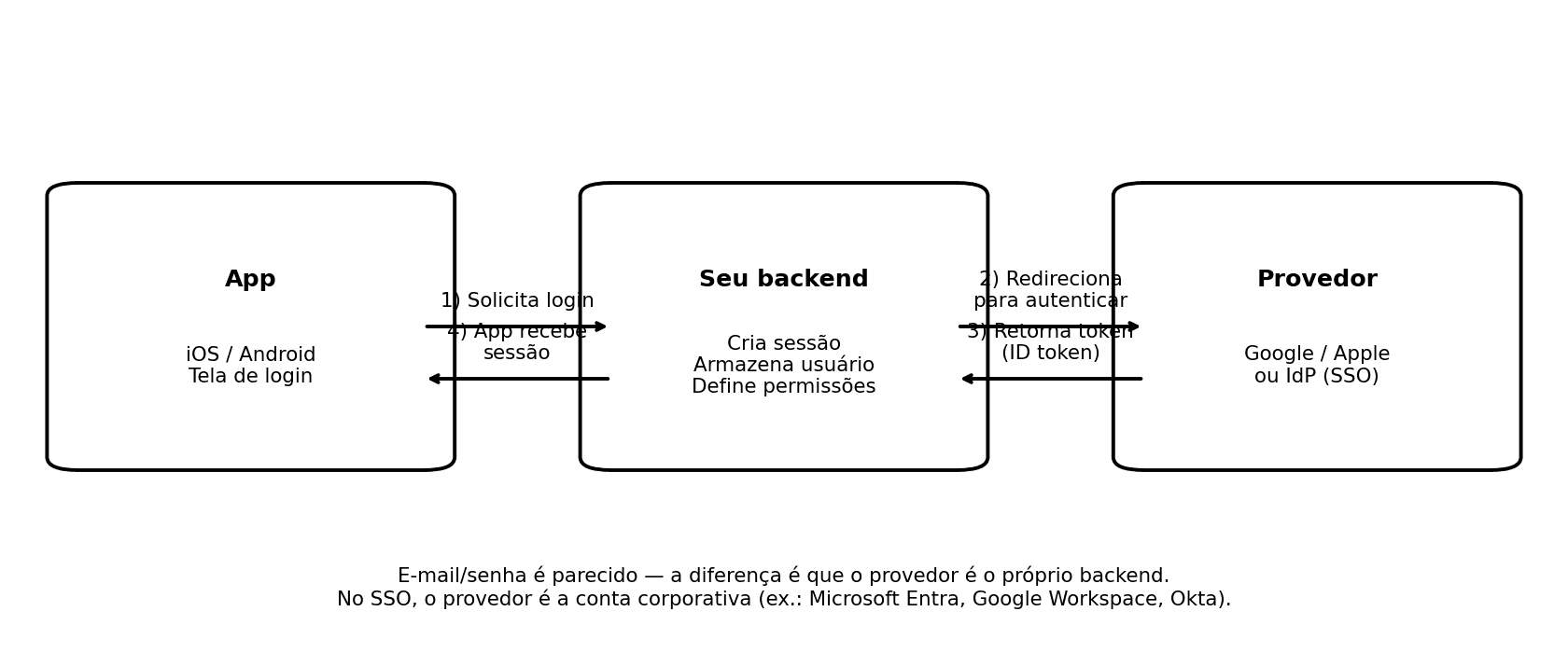
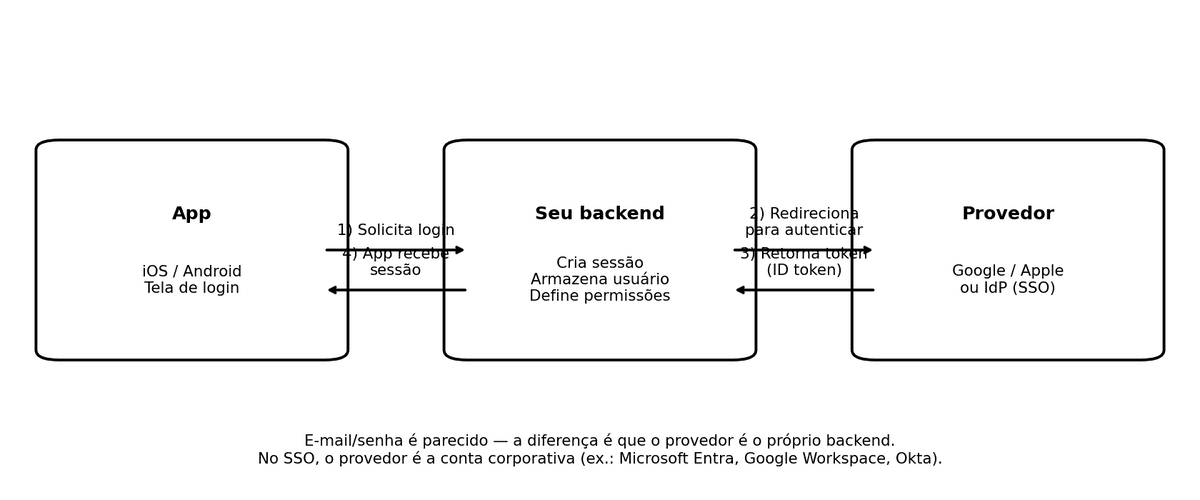
In this model, users do not create a password in your app: they authenticate with their Google account. Technically, this is based on OAuth 2.0 and OpenID Connect (your backend validates identity tokens).
When it makes sense
- Audience with high Android/Gmail usage.
- Need to reduce signup/login friction.
- Desire to leverage Google's account security baseline.
Advantages
- Lower friction (many users are already signed in on device).
- Fewer forgot-password tickets.
- Familiar user experience.
Drawbacks and considerations
- You still need a recovery path when users lose access to Google account.
- Duplicate-account issues can happen if identity linking is not planned well.
- On Android, implementation best practices evolve over time (today, Credential Manager is the modern path to unify passkeys, passwords, and federated login).
3) Apple login (Sign in with Apple)
"Sign in with Apple" is Apple's social login with strong privacy focus. Users can share real email or use "Hide My Email" (private relay address).
When it makes sense
- You have an iOS app (especially B2C).
- You want low friction with stronger privacy perception.
- You want to reduce App Store rejection risk when social login is present.
Advantages
- Fast experience for users already authenticated on device.
- Strong privacy posture (private email option).
- Lower forgot-password support than native email/password.
Drawbacks and practical notes
- "Hide My Email" can create support confusion if account UX is weak.
- In some cases, name/email availability is limited after first authorization; stable user identifier should drive account linking.
- If your app sends transactional emails, you need correct handling for private relay addresses.
Important iOS compliance point: login equivalence
If your app uses third-party/social login as primary account authentication (for example Google/Facebook), Apple requires an equivalent option aligned with privacy expectations (minimal data collection, private email option, no ad tracking without consent), with some exceptions (for example enterprise-only apps using corporate identity).
In practical terms, for most B2C apps: if you offer "Sign in with Google" on iOS, you should also offer "Sign in with Apple".
4) Enterprise SSO (Single Sign-On)
SSO means users log in with company/school identity (for example Microsoft Entra ID, Google Workspace, Okta): one identity across systems.
Two common protocol families behind this:
- SAML (common in traditional enterprise environments)
- OpenID Connect (OIDC) (common in modern app stacks)
You do not need protocol depth to make a product decision. The key operational effect is: the company controls who can access and when access is revoked.
When it makes sense
- B2B apps (internal use, partners, franchise networks, field teams).
- High turnover contexts where rapid access revocation matters.
- Environments with strict security/compliance requirements.
Advantages
- Lower support load: users do not manage an app-specific password.
- Centralized control: offboarding immediately removes access.
- Better compliance posture in many enterprise scenarios.
Disadvantages
- Requires customer IT/infra involvement (not a quick toggle).
- Can be overkill for mass B2C products.
- Needs fallback planning for IdP outages or configuration issues.
Quick comparison (without overcomplication)
| Option | Best for | Entry friction | Support ("I forgot...") | Privacy | Project complexity |
|---|
| Email/password | Broad audience; full control requirements | Medium/high | High | Depends on your design | Medium |
| Google | B2C, Android-heavy audience, faster onboarding | Low | Low/medium | Good if data collection is minimal | Medium |
| Apple | B2C on iOS, privacy, equivalence compliance | Low | Low/medium | Very strong | Medium |
| SSO | B2B, internal/partner/franchise scenarios | Low (for users) | Low | High (company-managed) | High |
How to choose in 5 questions
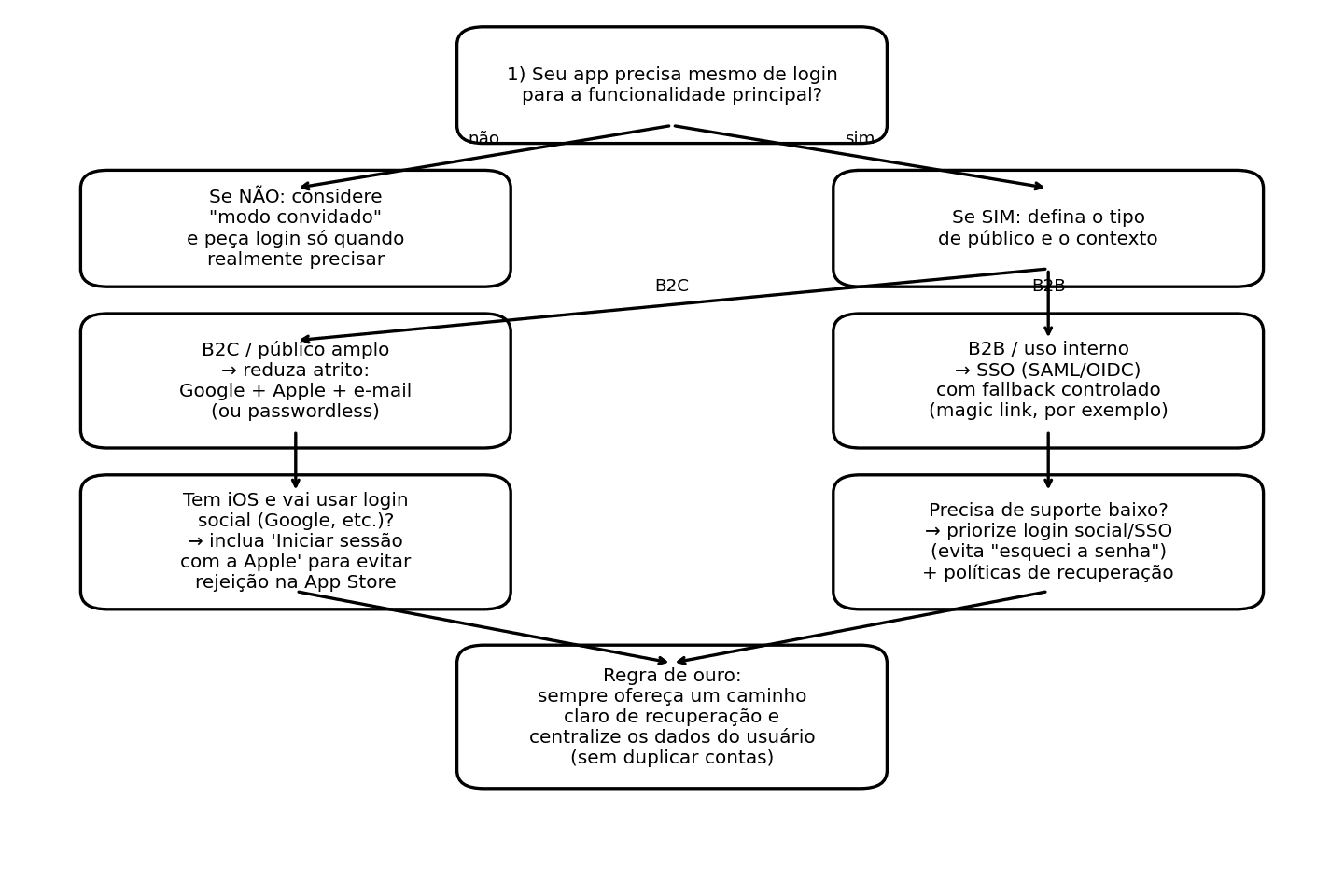
- Is your app B2C (general audience) or B2B (enterprise)?
B2C usually prioritizes low friction; B2B usually prioritizes control and governance.
- Do you need login at first app open?
If not, start with guest mode and ask for login later.
- Is your audience mostly Android or iOS?
This strongly influences Google/Apple adoption.
- Do you have support capacity for account issues?
If not, avoid depending only on email/password. Social login/SSO reduces ticket volume.
- Will you offer social login on iOS?
If yes, adding Apple login is often the safer path for compliance.
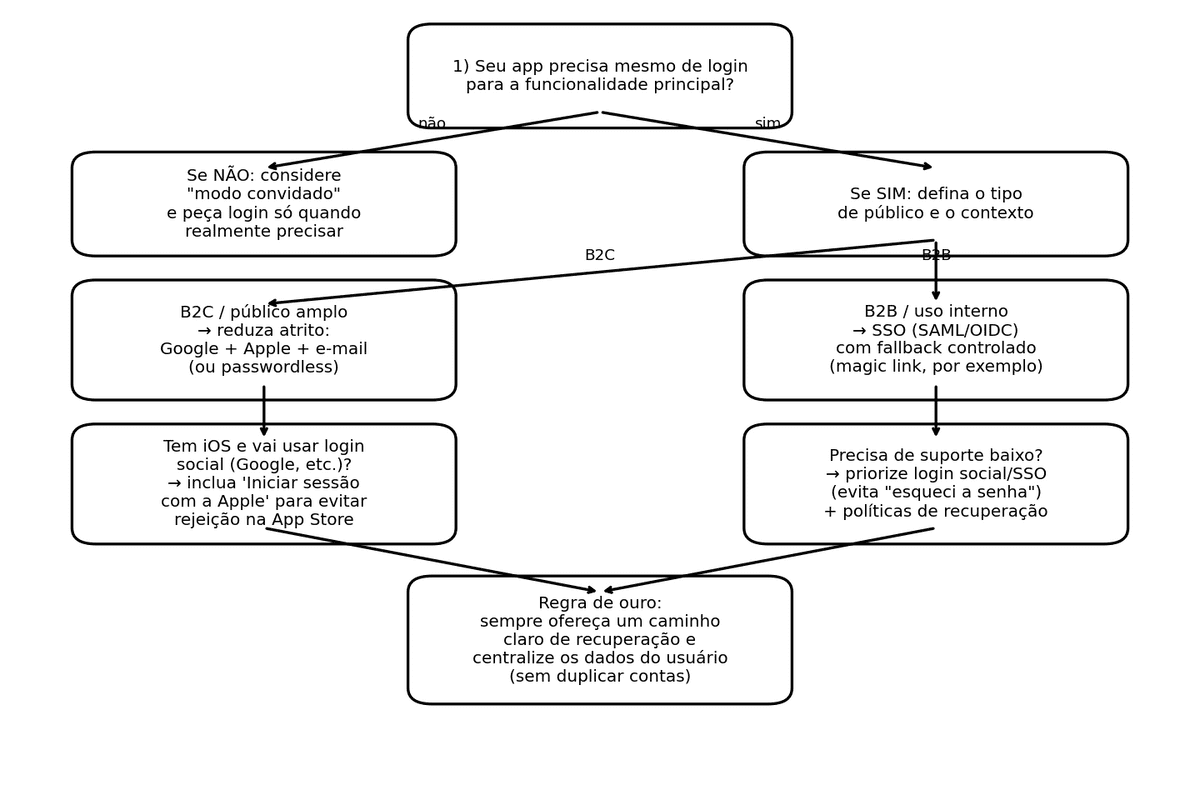
Strong combinations by scenario
Scenario A: B2C app (iOS + Android) that needs fast growth
Typical recommendation:
- Google + Apple + email alternative (ideally code/link-based, not mandatory password)
Why:
- lower friction;
- coverage across both ecosystems;
- fallback option for users who do not want social login.
Scenario B: B2B app (internal / partners)
Typical recommendation:
- Enterprise SSO (SAML/OIDC) as primary path
- controlled fallback (for example magic link for authorized external users)
Why:
- centralized lifecycle control;
- lower support burden;
- stronger security governance.
Scenario C: privacy-driven product positioning
Typical recommendation:
- Apple + minimal email flow plus transparent data policy
Why:
- less data collection;
- lower exposure;
- stronger trust perception.
Support impact: what really changes
With email/password, expect ongoing volume for:
- password resets;
- email changes;
- suspicious account takeover situations;
- fraud attempts during recovery.
Social login and SSO reduce this, but do not eliminate support: users can still lose provider access, change employer, or face mailbox delivery issues.
So regardless of model, keep two non-negotiables:
- Account recovery must exist and be tested before launch.
- One user = one account in your backend (avoid identity duplication/confusion).
Common mistakes that cause rework (and how to avoid them)
- Creating duplicate accounts without noticing
Example: user registers with email, then signs in with Google.
Solution: design account linking/unification from day one.
- Requesting too much data in social login
Solution: request only what is necessary (usually name/email) and expand only with a clear reason.
- Ignoring iOS equivalence requirement
Solution: if third-party login is available for the main account path, plan Apple login too (except valid exception cases).
- Not testing end-to-end account lifecycle
Solution: test signup, login, logout, device change, and recovery using a simple checklist.
Final take: what is the best login?
There is no universal best login. There is only the best login for your audience, channels (iOS/Android/web), support operation, and risk profile.
If you need a practical starting point:
- B2C: Google + Apple + email fallback (preferably passwordless when possible).
- B2B: SSO (SAML/OIDC) with controlled fallback.
- When login is not essential upfront: guest mode first, login at the right moment.